My server-side GTM container (it runs on sgtm.marius.digital) uses two custom client templates that I imported from GitHub: Stape’s Data Client and Simo Ahava’s Catch-all Client. The tag and variable templates in the same container come from the Community Template Gallery, and GTM tells me when one of them has an update. The client templates don’t. There are no client templates in the Gallery, so I had to import them by hand, and GTM has no idea where they came from.
When I finally checked, my Data Client was the version from January 2024. It was 9 releases behind, and those releases include a fix for the client ID generation (the _dcid cookie) and cookie consent gating. Nothing told me.
In this guide, I will show you step-by-step how to check GitHub for new releases of your custom templates automatically and stage them in a GTM workspace, so all you have to do is review and publish. I run it on my NAS, but I’ll also show you a version that runs on Google Apps Script, if you don’t have a NAS (or any other server).
How it works
Every template made for the Gallery has a metadata.yaml file in its repository, with a list of releases. Each release is a commit (the sha) and a short change note. This is the same file GTM reads for the Gallery templates, so we can use it too:
- Read
metadata.yamland take the newest release. - Compare its
template.tplwith the template in the live version of the container. - If the live one is an older release, write the new code into a workspace called “Template sync” (created if it doesn’t exist).
- Send me the change notes and the link to the workspace.
There are multiple ways to do this, but I decided not to publish the update automatically. A template update can change the permissions or the default values of the fields, and some updates need a change somewhere else too. For example, the release note of the _dcid fix says “Make sure to update the Data Tag in GTM Web as well”. I want to read that before it goes live, not after. The script only does the boring part (finding the update and putting it in place), and I still decide when to publish.
I also chose to follow the releases from metadata.yaml and not the latest commit, as authors sometimes commit work that isn’t ready. But it can be the other way around too. Simo’s Catch-all Client got two fixes in 2022 that were never added as a release, and my copy already had them. Without a special case, the script would have “updated” my template to an older release. So if the live template matches the latest commit, the script treats it as up to date. If it matches neither a release nor the latest commit (e.g. you edited the template yourself), it tells you and doesn’t touch it.
Two things surprised me while testing, and the code handles both:
- GTM removes the Terms of Service block from the top of the file when it saves a template, so the file from GitHub and the one in GTM are never identical.
- GTM also re-wraps the long lines of the template’s tests (the
___TESTS___section) when it saves it. Tests don’t run in your container, so the comparison ignores them. Otherwise the script would think the update is missing every single week.
Here’s what we need to get started
- A GTM container with custom templates imported from GitHub (it works for any template with a
metadata.yaml, not only client templates in server containers). - Your account ID and container ID. They’re in the GTM URL:
tagmanager.google.com/#/container/accounts/6002360651/containers/179147248/… - A NAS (or any machine) that can run Docker, or a Google account for the Apps Script version.
Option 1: Run it on your NAS with Docker
This is how I run it. The NAS is on 24/7 anyway and it already runs my other scheduled jobs, so it was the obvious place.
1. Create a service account for GTM
The script needs its own Google login, so we’ll use a service account:
- In the Google Cloud console, pick a project (or create one) and enable the Tag Manager API (APIs & Services → Library).
- Go to IAM & Admin → Service Accounts → Create service account. It doesn’t need any roles in Google Cloud.
- Open the service account → Keys → Add key → JSON. Save the file as
sa.json. - In GTM, go to Admin → User Management (on the container) and add the service account’s email address with Edit permission. Edit is enough, as the script never publishes.
In my case, I reused the service account I already had for my GTM and GA4 automations (it has Publish, but the script doesn’t use it). Treat the JSON key like a password: anyone who has it can edit your container.
2. Add the script and the list of templates
Create a folder on your NAS (I’ll use /volume1/docker/gtm-template-sync, but you can freely change it) and put sa.json in it. Next, create gtm_template_sync.py in the same folder. Copy & paste the following code:
#!/usr/bin/env python3
"""Stage GTM custom template updates from GitHub (reader version for the
marius.digital article; Marius's own NAS runs projects/mariusdigital/scripts/).

  python gtm_template_sync.py --list ACCOUNT_ID CONTAINER_ID   # find template ids
  python gtm_template_sync.py [--dry-run]                      # check and stage

Needs: pip install google-auth requests
Env:   GOOGLE_APPLICATION_CREDENTIALS  service account JSON key (Edit on the container)
       TEMPLATES_CONFIG                default: templates.json next to this file
       TELEGRAM_BOT_TOKEN, TELEGRAM_CHAT_ID   optional, to get a message
"""
import json, os, re, sys, urllib.request, urllib.parse
from google.oauth2 import service_account
from google.auth.transport.requests import Request

API = "https://tagmanager.googleapis.com/tagmanager/v2/"
SCOPES = ["https://www.googleapis.com/auth/tagmanager.edit.containers"]

def normalize(tpl):
    # GTM drops the Terms of Service header and re-wraps ___TESTS___ when it
    # saves a template, so neither counts as a difference.
    s = tpl.replace("\r\n", "\n").lstrip("")
    s = s[s.find("___INFO___"):]
    s = re.sub(r"___TESTS___\n.*?(?=\n___[A-Z_]+___(?:\n|\Z)|\Z)", "___TESTS___\n", s, flags=re.S)
    return s.strip()

def releases(metadata):
    # [(sha, notes)] from metadata.yaml, newest first
    out, block = [], None
    for line in metadata.replace("\r\n", "\n").split("\n"):
        m = re.match(r"\s*-\s*sha:\s*['\"]?([0-9a-f]{7,40})", line)
        if m:
            out.append([m.group(1), ""]); block = None; continue
        m = re.match(r"(\s*)changeNotes:\s*(.*)$", line)
        if out and m:
            if m.group(2)[:1] in "|>" and m.group(2):
                block = len(m.group(1))
            else:
                out[-1][1] = m.group(2).strip("'\""); block = None
        elif out and block is not None and line.strip():
            if len(line) - len(line.lstrip()) <= block:
                block = None
            else:
                out[-1][1] = (out[-1][1] + " " + line.strip()).strip()
    return out

def fetch(url, method="GET", body=None, token=None):
    headers = {"User-Agent": "gtm-template-sync"}
    if token:
        headers["Authorization"] = "Bearer " + token
    if body is not None:
        headers["Content-Type"] = "application/json"
        body = json.dumps(body).encode()
    req = urllib.request.Request(url, body, headers, method=method)
    with urllib.request.urlopen(req, timeout=60) as r:
        return r.read().decode("utf-8")

def raw(repo, ref, path="template.tpl"):
    return fetch("https://raw.githubusercontent.com/%s/%s/%s" % (repo, ref, path))

class GTM:
    def __init__(self):
        creds = service_account.Credentials.from_service_account_file(
            os.environ["GOOGLE_APPLICATION_CREDENTIALS"], scopes=SCOPES)
        creds.refresh(Request())
        self.token = creds.token

    def call(self, path, method="GET", body=None):
        return json.loads(fetch(API + path, method, body, self.token))

def live_copy(gtm, container, template_id):
    for t in gtm.call(container + "/versions:live").get("customTemplate", []):
        if t["templateId"] == template_id:
            return t["templateData"]
    raise SystemExit("template %s is not in the live version of %s" % (template_id, container))

def workspace(gtm, container, name, create):
    for w in gtm.call(container + "/workspaces").get("workspace", []):
        if w["name"] == name:
            return w
    if create:
        return gtm.call(container + "/workspaces", "POST", {"name": name})

def check(gtm, t, ws_name, dry_run):
    repo, container, tid = t["repo"], t["container"], t["templateId"]
    rel = releases(raw(repo, "HEAD", "metadata.yaml"))
    newest = raw(repo, rel[0][0])
    live = normalize(live_copy(gtm, container, tid))
    if live in (normalize(newest), normalize(raw(repo, "HEAD"))):
        return None  # up to date (or newer than the last release)
    behind = next((i for i, (sha, _) in enumerate(rel) if normalize(raw(repo, sha)) == live), None)
    if behind is None:
        return "%s: live copy matches no release, edited by hand? Not touched." % repo
    ws = workspace(gtm, container, ws_name, not dry_run)
    if ws:
        staged = gtm.call(ws["path"] + "/templates/" + tid)
        if normalize(staged["templateData"]) == normalize(newest):
            return None  # already staged, waiting for you to publish
        if not dry_run:
            gtm.call(staged["path"] + "?fingerprint=" + staged["fingerprint"], "PUT",
                     {"name": staged["name"], "templateData": newest})
    notes = "\n".join("- %s: %s" % (sha[:7], n) for sha, n in rel[:behind])
    where = ("https://tagmanager.google.com/#/container/accounts/%s/containers/%s/workspaces/%s"
             % (ws["accountId"], ws["containerId"], ws["workspaceId"])) if ws else "(dry run)"
    return "%s: %d release(s) behind, %s %s\n%s\nReview and publish: %s" % (
        repo, behind, "would stage" if dry_run else "staged", rel[0][0][:7], notes, where)

def telegram(text):
    bot, chat = os.environ.get("TELEGRAM_BOT_TOKEN"), os.environ.get("TELEGRAM_CHAT_ID")
    if bot and chat:
        fetch("https://api.telegram.org/bot%s/sendMessage" % bot, "POST",
              {"chat_id": chat, "text": text, "disable_web_page_preview": True})

def main():
    gtm = GTM()
    if sys.argv[1:2] == ["--list"]:
        c = "accounts/%s/containers/%s" % (sys.argv[2], sys.argv[3])
        for w in gtm.call(c + "/workspaces")["workspace"][:1]:
            for t in gtm.call(w["path"] + "/templates").get("template", []):
                print(t["templateId"], t["name"], "(Gallery)" if t.get("galleryReference") else "")
        return
    dry_run = "--dry-run" in sys.argv
    here = os.path.dirname(os.path.abspath(__file__))
    cfg = json.load(open(os.environ.get("TEMPLATES_CONFIG", os.path.join(here, "templates.json"))))
    reports = [r for r in (check(gtm, t, cfg.get("workspace", "Template sync"), dry_run)
                           for t in cfg["templates"]) if r]
    if reports:
        text = "GTM template updates\n\n" + "\n\n".join(reports)
        print(text)
        if not dry_run:
            telegram(text)

if __name__ == "__main__":
    main()Code language: HTML, XML (xml)
To find the IDs of your templates, run the script once with --list and your account and container IDs:
cd /volume1/docker/gtm-template-sync
docker run --rm -v "$PWD":/app -w /app -e GOOGLE_APPLICATION_CREDENTIALS=/app/sa.json \
  python:3.12-slim sh -c "pip install -q google-auth requests && python gtm_template_sync.py --list 6002360651 179147248"Code language: JavaScript (javascript)
This is what I got for my server container. The ones marked “(Gallery)” already update themselves, so we only need the other two:
8 Cookie Monster (Gallery)
9 Facebook Conversion API (Gallery)
10 HTTP Lookup (Gallery)
11 sha256 Hasher (Gallery)
12 Catch-all Client
13 Data ClientCode language: PHP (php)
Now create templates.json in the same folder, with one line per template: the container, the template ID and the GitHub repository it comes from. Mine looks like this:
{
  "workspace": "Template sync",
  "templates": [
    {"container": "accounts/6002360651/containers/179147248", "templateId": "13", "repo": "stape-io/data-client"},
    {"container": "accounts/6002360651/containers/179147248", "templateId": "12", "repo": "gtm-templates-simo-ahava/catch-all-client"}
  ]
}Code language: JSON / JSON with Comments (json)
3. (Optional) Get a Telegram message
An update sitting in a workspace that nobody looks at doesn’t help much, so I want a message when there is one. The script can send it to Telegram: create a bot with @BotFather, then put its token and your chat ID in a telegram.env file in the same folder:
TELEGRAM_BOT_TOKEN=123456:your-bot-token
TELEGRAM_CHAT_ID=your-chat-id
If you skip this, the script only prints the report, and you can use whatever notification your NAS scheduler has.
4. Test it
First, run it with --dry-run. It checks everything but doesn’t write anything to GTM:
docker run --rm -v "$PWD":/app -w /app -e GOOGLE_APPLICATION_CREDENTIALS=/app/sa.json \
  --env-file telegram.env python:3.12-slim \
  sh -c "pip install -q google-auth requests && python gtm_template_sync.py --dry-run"Code language: JavaScript (javascript)
If it looks right, run the same command without --dry-run. This is what I got for my container on the first real run:
GTM template updates

stape-io/data-client: 9 release(s) behind, staged 9c89172
- 9c89172: Added option to return the response before container logic runs.
- d0eaccc: Improved "Generate Client ID" help text.
- ac39646: Added cookie consent gating for setting cookies.
- 635db94: Code organization and formatting only.
- 7c813f3: Fixed the Client ID auto generation when the _dcid cookie does not exist and multiple requests are sent at once. Make sure to update the Data Tag in GTM Web as well.
- 3992d61: Fix the return status when there is no default value to be returned. Fix the event when processing the container takes more than 5 seconds to run the event.
- 2cd52aa: Add x-stape-app-version to Access-Control-Allow-Headers headers.
- 953bf24: Fix for timestamp and unique_event_id override.
- a9fb729: Fixed location response header bug.
Review and publish: https://tagmanager.google.com/#/container/accounts/6002360651/containers/179147248/workspaces/4Code language: JavaScript (javascript)
The Catch-all Client isn’t in the report, as it’s already up to date. Then I ran it a second time, and it printed nothing at all: the update is already in the workspace, so it doesn’t stage it again or send the same message every week.
5. Run it every week
Template updates don’t come out every day, so once a week is plenty. I run it every Monday at 09:05. On my UGREEN NAS, the scheduled jobs are systemd user timers, as UGOS doesn’t have a task scheduler in the Control Panel (I explained the whole setup in how to run cron jobs on a UGREEN NAS). On a Synology, the equivalent would be a user-defined script in Control Panel → Task Scheduler, with the docker run command from step 4.
Full disclosure: the script on my own NAS is a slightly different version that fits in with my other NAS scripts (it gets its token another way and sends the Telegram message through my Hermes agent), but the logic is the same as above.
Option 2: No NAS? Use Google Apps Script
If you don’t have a NAS or a server, Google Apps Script can do the same thing for free, on Google’s servers. It has one big advantage: it runs as your own Google account, so you don’t need a service account or a JSON key at all (some company Google accounts don’t even allow creating keys). It also emails you the report with Gmail, so there’s no Telegram bot to set up.
- Go to script.google.com and create a new project (e.g. “GTM template sync”).
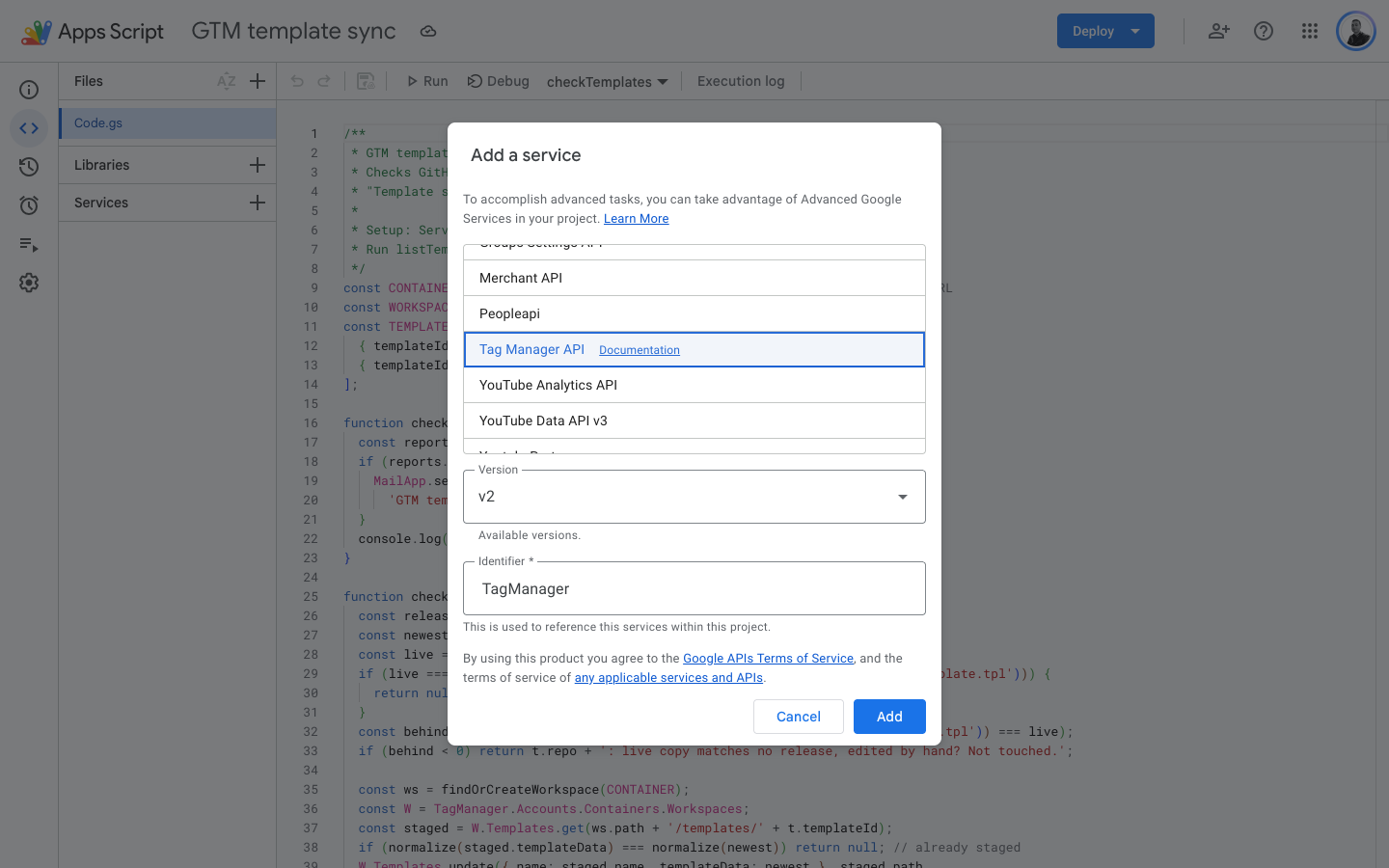
- Click the + next to Services, pick Tag Manager API and keep the identifier
TagManager. - Replace the content of
Code.gswith the code below and changeCONTAINERto your account and container IDs. - Select
listTemplatesin the toolbar and click Run. Google asks you to allow access the first time. As it’s your own script, it also warns that Google hasn’t verified the app: click Advanced and go to the project. The log shows your template IDs, same as the--listoutput above. Add the ones you need toTEMPLATES. - Run
checkTemplatesonce to test it. - Last, but not least, run
createWeeklyTriggeronce. From now on, it runs every Monday between 9 and 10.
The Services dialog should look like this:
Copy & paste the following code into Code.gs:
/**
 * GTM template sync for Google Apps Script (no server needed).
 * Checks GitHub for newer releases of your custom templates, stages them in a
 * "Template sync" workspace and emails you the change notes. Never publishes.
 *
 * Setup: Services (+) → Tag Manager API (v2), identifier "TagManager".
 * Run listTemplates() to find the ids, then createWeeklyTrigger() once.
 */
const CONTAINER = 'accounts/6002360651/containers/179147248'; // from the GTM URL
const WORKSPACE_NAME = 'Template sync';
const TEMPLATES = [ // template ids: run listTemplates() once
  { templateId: '13', repo: 'stape-io/data-client' },
  { templateId: '12', repo: 'gtm-templates-simo-ahava/catch-all-client' },
];

function checkTemplates() {
  const reports = TEMPLATES.map(checkTemplate).filter(Boolean);
  if (reports.length) {
    MailApp.sendEmail(Session.getEffectiveUser().getEmail(),
      'GTM template updates staged', reports.join('\n\n'));
  }
  console.log(reports.join('\n\n') || 'Everything is up to date.');
}

function checkTemplate(t) {
  const releases = parseReleases(raw(t.repo, 'HEAD', 'metadata.yaml'));
  const newest = raw(t.repo, releases[0].sha, 'template.tpl');
  const live = normalize(liveCopy(CONTAINER, t.templateId));
  if (live === normalize(newest) || live === normalize(raw(t.repo, 'HEAD', 'template.tpl'))) {
    return null; // up to date (or newer than the last release)
  }
  const behind = releases.findIndex(r => normalize(raw(t.repo, r.sha, 'template.tpl')) === live);
  if (behind < 0) return t.repo + ': live copy matches no release, edited by hand? Not touched.';

  const ws = findOrCreateWorkspace(CONTAINER);
  const W = TagManager.Accounts.Containers.Workspaces;
  const staged = W.Templates.get(ws.path + '/templates/' + t.templateId);
  if (normalize(staged.templateData) === normalize(newest)) return null; // already staged
  W.Templates.update({ name: staged.name, templateData: newest }, staged.path,
    { fingerprint: staged.fingerprint });

  return t.repo + ': ' + behind + ' release(s) behind, staged ' + releases[0].sha.slice(0, 7) + '\n' +
    releases.slice(0, behind).map(r => '- ' + r.sha.slice(0, 7) + ': ' + r.notes).join('\n') +
    '\nReview and publish: https://tagmanager.google.com/#/container/accounts/' + ws.accountId +
    '/containers/' + ws.containerId + '/workspaces/' + ws.workspaceId;
}

function liveCopy(container, templateId) {
  const live = TagManager.Accounts.Containers.Versions.live(container);
  const t = (live.customTemplate || []).find(x => x.templateId === templateId);
  if (!t) throw new Error('Template ' + templateId + ' is not in the live version of ' + container);
  return t.templateData;
}

function findOrCreateWorkspace(container) {
  const W = TagManager.Accounts.Containers.Workspaces;
  const found = (W.list(container).workspace || []).find(w => w.name === WORKSPACE_NAME);
  return found || W.create({ name: WORKSPACE_NAME }, container);
}

function raw(repo, ref, path) {
  return UrlFetchApp.fetch('https://raw.githubusercontent.com/' + repo + '/' + ref + '/' + path)
    .getContentText('UTF-8');
}

// GTM drops the Terms of Service header and re-wraps ___TESTS___ when it saves
// a template, so neither counts as a difference.
function normalize(tpl) {
  const parts = tpl.replace(/\r\n/g, '\n').replace(/^/, '').split(/^(___[A-Z_]+___)$/m);
  let out = '';
  for (let i = 1; i < parts.length; i += 2) {
    if (parts[i] === '___TERMS_OF_SERVICE___') continue;
    out += parts[i] + '\n' + (parts[i] === '___TESTS___' ? '' : parts[i + 1].trim()) + '\n';
  }
  return out.trim();
}

// [{sha, notes}] from the Gallery metadata.yaml, newest first.
function parseReleases(yaml) {
  const out = [];
  let block = null;
  for (const line of yaml.replace(/\r\n/g, '\n').split('\n')) {
    let m = line.match(/^\s*-\s*sha:\s*['"]?([0-9a-f]{7,40})/);
    if (m) { out.push({ sha: m[1], notes: '' }); block = null; continue; }
    if (!out.length) continue;
    m = line.match(/^(\s*)changeNotes:\s*(.*)$/);
    if (m) {
      if (/^[|>]/.test(m[2])) block = m[1].length;
      else { out[out.length - 1].notes = m[2].replace(/^['"]|['"]$/g, ''); block = null; }
    } else if (block !== null && line.trim()) {
      if (line.length - line.trimStart().length <= block) block = null;
      else out[out.length - 1].notes = (out[out.length - 1].notes + ' ' + line.trim()).trim();
    }
  }
  return out;
}

// Logs the id and name of every custom template in CONTAINER.
function listTemplates() {
  const W = TagManager.Accounts.Containers.Workspaces;
  const ws = W.list(CONTAINER).workspace[0];
  (W.Templates.list(ws.path).template || []).forEach(t =>
    console.log(t.templateId + ' ' + t.name + (t.galleryReference ? ' (Gallery)' : '')));
}

function createWeeklyTrigger() {
  ScriptApp.newTrigger('checkTemplates').timeBased()
    .onWeekDay(ScriptApp.WeekDay.MONDAY).atHour(9).create();
}Code language: JavaScript (javascript)
This is how it looks on my server container after running listTemplates:

My two clients are 12 and 13. The ones marked (Gallery) already get updates from GTM, so I left them out.
Next, I ran checkTemplates. Both of my templates were already current (I had just published the Data Client update from Option 1), so it only logged that everything is up to date and didn’t send an email:
After you run createWeeklyTrigger, the trigger shows up under Triggers (the clock icon on the left):
As my NAS already does this every Monday, I deleted the trigger after the test. You only need one of the two, otherwise you get the same update twice (once on Telegram and once by email).
Review and publish the update
When the message arrives, open the link. It goes straight to the “Template sync” workspace, where the template shows up as modified. Read the change notes, check if any of them need a change elsewhere (like the Data Tag one above), and test in Preview mode like any other change. I would never publish a server container without seeing a few requests go through Preview first.
If everything looks good, click Submit and publish. GTM removes the workspace once it’s published, and the script creates a new one when the next update comes out.
That’s it! Your custom templates now get updates almost like the Gallery ones, except you get the change notes first.
Limitations
- It only works for templates that have a
metadata.yamlwith releases (all templates made for the Gallery do). For a template without it, there’s nothing to compare against. - It updates the template only. If a release also needs a change in your web container (like Stape’s Data Tag), you still have to do that yourself.
- If you edited a template in GTM, the script won’t overwrite your changes. It tells you instead, every week, until you fix it.
- It needs a free workspace. The free version of GTM allows 3 workspaces per container (the Default one included), so if you already use all 3, the script can’t create its own and stops with an error.
- For the tag and variable templates from the Gallery, you don’t need any of this, as GTM already shows you when there’s an update.
I am hoping Google will eventually allow client templates in the Gallery, so this script becomes unnecessary. Until then, let me know in the comments if it works for your templates too.